


WhatsApp Business App vs WhatsApp Business API: Which One Does Your Business Actually Need?
Every growing business hits the same moment. WhatsApp is working. Customers are messaging in, orders are coming through, questions are getting answered. And then, almost overnight, it stops feeling like a win and starts feeling like chaos.
Two people are replying from the same phone. Nobody knows who answered which customer. A lead messages in at 9 PM and doesn't get a reply until the next afternoon, because whoever had the phone was asleep. Sound familiar?
If it does, you've probably already searched some version of "WhatsApp Business App vs WhatsApp Business API," trying to figure out whether you need to upgrade, and to what. This guide breaks it down in plain language, no jargon, no sales pitch, just what each option actually does and how to know which one fits where your business is right now.
The Short Answer
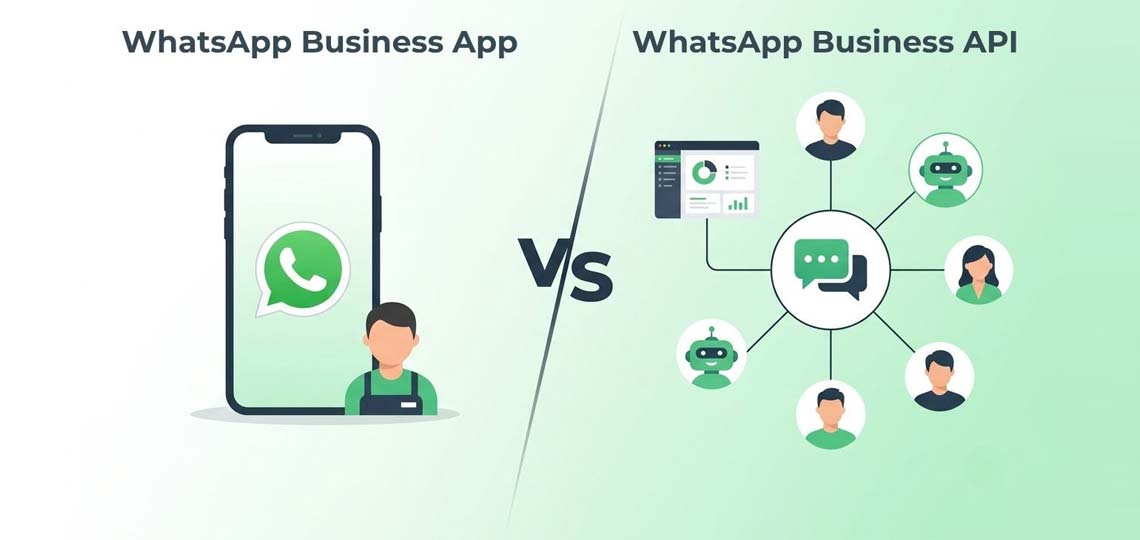
The WhatsApp Business App is a free app built for one person managing WhatsApp from one phone. The WhatsApp Business API is a solution built for teams, built to scale, and built to connect with the other tools your business already runs on: your CRM, your website, your support desk.
They're not really "versions" of the same thing. They're built for two different stages of business.
What the WhatsApp Business App Actually Does
SMS is often treated as the old workhorse of business messaging, and in some ways it is. But that's exactly its strength. It doesn't need an internet connection; it works on every phone regardless of make or operating system, and it lands almost instantly. For anything time-sensitive or mission-critical, that reliability is hard to beat.
It's genuinely useful when:
- You're a solo business owner or a very small team
- One person realistically handles all the customer messages
- You don't need automation, you just need to reply personally
- Your message volume is low enough that missing one occasionally isn't a crisis
It comes with a few handy basics, like quick replies, labels to organise chats, and a simple catalogue to show off products. For a boutique, a home baker, a freelancer, it's often exactly enough.
Where it starts to break down is growth. The app is single-device by design. You can't have three team members logged in and replying at once without switching phones back and forth. There's no way to automatically route a lead to the right person. There's no real reporting to see how fast your team is actually responding. And there's no way to plug it into the CRM or booking system you're already using.
What the WhatsApp Business API Actually Does
This is where things change shape. The WhatsApp Business API isn't an app you download. It's a connection that lets your business communicate with customers on WhatsApp through the tools and platforms your team already works in.
In practice, this means a WhatsApp automation platform like Tech Pioneer sits on top of the API and gives your business:
- A shared inbox where multiple team members can see and reply to conversations, without ten people crowding around one phone
- WhatsApp chatbots for business that answer common questions instantly, qualify leads, and collect details before a human even joins the conversation
- The ability to send order updates, appointment reminders, and payment confirmations automatically the moment something happens on your end
- WhatsApp bulk messaging for announcements, offers, and updates sent to your entire customer base at once, with delivery tracking so you know what landed
- A verified green-tick business profile, so customers know they're messaging the real you
- Integration with your CRM, so every WhatsApp conversation becomes part of a customer's actual history, not a message that disappears into a phone nobody else can access.
None of this is about replacing the personal, human side of WhatsApp. It's about making sure that personal touch can actually scale past one person on one phone.
Side by Side: What's Really Different
- Who it's for: The app is built for solo owners and very small teams. The API is built for growing businesses with actual teams handling conversations.
- Number of users: The app only works from one device at a time. The API lets multiple team members reply simultaneously from a shared inbox.
- Automation: The app offers basic quick replies and nothing more. The API supports full chatbots, workflows, and auto-replies.
- CRM and tool integration: The app has none. The API integrates fully with your CRM, website, and other business tools.
- Bulk messaging: On the app, it's manual and limited. On the API, it's automated, trackable, and built to scale.
- Reporting: The app gives you nothing to measure. The API tracks response times, team performance, and delivery status.
- Verified badge: Not available on the app. Available on the API, giving your business a verified green-tick profile.
- Cost: The app is free. The API is paid, based on usage, but built for the scale it enables.
So, Which One Do You Actually Need?
Stick with the app if: you're a one-person operation, your message volume is genuinely manageable by one phone, and you don't yet need automation, team access, or reporting. There's no shame in this. Plenty of small businesses run perfectly well on the app for years.
It's time to move to the API if: more than one person needs to reply to customers, you're losing track of who said what to whom, leads are going cold because nobody saw the message in time, or you're manually sending the same order update or reminder to customer after customer. If any of that sounds like your Tuesday afternoon, the app has quietly become the bottleneck, not the solution.
A good rule of thumb: if you've ever thought "we really need another phone for WhatsApp," that's usually the moment to look at a proper WhatsApp API service for business instead of adding more devices to the pile.
Making the Switch Doesn't Mean Starting Over
One thing worth knowing: moving from the app to the API doesn't mean losing your number, your chat history, or starting from zero. A good WhatsApp automation partner handles that migration for you, so your business keeps its identity on WhatsApp while gaining everything the API unlocks underneath it.
At Tech Pioneer Platforms, this is exactly what we help growing businesses do, move from a single phone and a single person managing WhatsApp, to a proper WhatsApp Business API solution with a shared inbox, automation, and reporting, without losing the personal, responsive feel customers already like about messaging you.
Frequently Asked Questions
Is the WhatsApp Business API more expensive than the app?
The app is free, while the API involves usage-based costs since it's built for scale, automation, and team access. For businesses handling real message volume, the time saved and leads no longer missed usually make up the difference quickly.
Can I keep my existing WhatsApp number when switching to the API?
Yes. Your existing number can typically be migrated to the API, so customers continue messaging the same number they already know.
Do I need technical knowledge to use the WhatsApp Business API?
No. Platforms like Tech Pioneer manage the technical setup, integration, and automation, so your team can focus on conversations, not configuration.
Ready to see whether your business has outgrown a single WhatsApp number? Talk to Tech Pioneer Platforms about moving to a proper WhatsApp Business API setup.
